Televés iTCalc:design and calculate telecommunications installations
iTCalc is a free application designed to speed up the design of telecommunications installations using Televés equipment: coaxial networks, optical fibre, copper pairs, MATV and SMATV, headends, racks, cost estimates and Open BIM integration.
What is iTCalc and why is it useful for installers and designers?
iTCalc is free software for the calculation and design of telecommunications installations, developed by CYPE Ingenieros with technical advice and supervision from Televés. The application uses product references from the Televés catalogue and supports the entire process, from network planning and calculations to product selection, graphical layouts, documentation and project export.
Its main strength is bringing together tasks that would otherwise require switching between catalogues, spreadsheets, diagrams and cost estimates. In iTCalc, you can build a network, insert equipment, review connections, check products, estimate cable quantities, work with floor plans, generate reports and share the project as part of an Open BIM workflow.
It is more than just a product library. Its purpose is to reduce configuration time and minimise design errors, particularly in MATV and SMATV installations, coaxial and fibre networks, amplification headends and equipment racks.
What's new in iTCalc: features for faster design with fewer steps
The latest version focuses particularly on working more efficiently. The aim is to spend less time searching for product references, repeating configurations or recreating information that the software can already generate automatically.
A smoother process from calculations to products and documentation
The improvements cover equipment selection, configuration reuse, cable quantity tracking and result export. This is particularly helpful when dealing with recurring project types or preparing several variations of the same installation.
Product reference search and direct access to product pages
Find equipment without leaving the design workflow and open its product page directly to review specifications and technical information.
Predefined element groups from Televés
Import ready-made groups to speed up common configurations and reduce the manual selection of repetitive components.
Cable quantity estimation
As equipment and cable routes are defined, the project can show estimated cable requirements, helping you plan materials in advance.
Reusable wizard configurations
Save a configuration to recover it when reopening the project, or export it as a starting point for future installations.
Graphical reports and CSV export
Generate result documentation with graphical information and export calculation data to CSV for use in other applications.
Which telecommunications installations can you design with iTCalc?
iTCalc covers several network technologies and lets you adapt the working environment to the needs of each project. Select an option to see what the software offers.
What would you like to design?
Switch between technologies to discover their most common uses in iTCalc.
Design terrestrial and satellite TV distribution
The SMATV wizard helps define the network and select a solution compatible with Televés equipment, including automatic headend adjustment and connection checks.
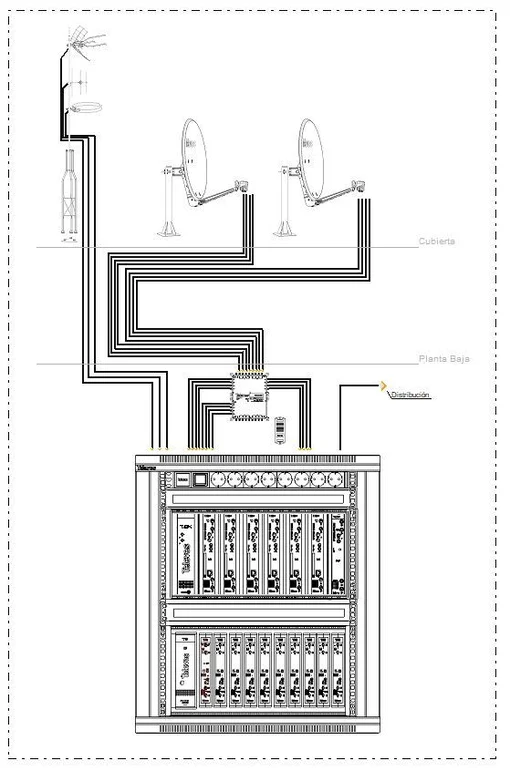
Graphical design of headends, racks and installations on floor plans
One of the most useful differences with iTCalc is that your project is not limited to a calculation table. The installation can be represented graphically, making it easier to understand network topology, equipment layouts and the relationship between the network and the building.
Visualising the installation helps identify errors before work begins on site
iTCalc lets you build headends and racks, position outlets on floor plans and visually review equipment connections. This graphical layer becomes especially useful as installations increase in floors, branches or services.
How to work with iTCalc: from the initial design to cost estimates and IFC
The software's full value becomes clear when you view it as an end-to-end project workflow. Not every function is needed on every job, but the following sequence illustrates a typical process.
Seven steps from the initial idea to a documented installation
For repeat projects, wizards and saved configurations can significantly reduce the time spent on the early stages.
Create the project
Start a new project and, if you are working collaboratively, connect it to a BIMserver.center workflow.
Choose the technology
Select the network type: MATV, SMATV, coaxial, optical fibre, copper pairs or a combination suited to the project.
Use wizards and predefined groups
Configure the installation using the appropriate wizard and reuse existing element groups or saved settings whenever possible.
Build the diagram and add equipment
Select Televés product references, position them in the network and open product pages when you need to validate specifications.
Run calculations and check warnings
Perform the calculations, review results and resolve connection warnings, particularly for components such as multiswitches.
Complete headends, racks and floor plans
Arrange equipment visually, work with floor plans and ensure the logical diagram matches the physical installation.
Generate documentation and share
Prepare estimates, reports and CSV files and, where required, export IFC data to integrate the installation into the Open BIM workflow.
Key iTCalc features that can save the most time on a project
Not every tool offers the same value on every project. These features can make a significant difference in everyday work thanks to their impact on product selection, verification and documentation.
SMATV wizard
Helps structure the installation and lets you save its configuration for later recovery or reuse in other projects.
- Less repetitive setup
- A consistent starting point
Automatic headend adjustment
Speeds up the configuration of headend equipment and reduces manual iterations when designing television networks.
- Faster iterations
- More consistent configurations
Product reference search
Find products and open their official pages directly for more information without disrupting the project workflow.
- Faster product selection
- Fewer reference errors
Predefined groups
Ready-made Televés component groups speed up the addition of common configurations to an installation.
- Reusable solutions
- Fewer clicks and omissions
Cable quantity tracking
Knowing the approximate cable quantity while designing the installation helps prepare materials and cost estimates.
- Material planning
- More accurate cost estimation
Headend and rack estimates
Selected equipment can form the basis of a cost estimate, reducing duplicated work between technical design and pricing.
- Product-to-cost traceability
- Less manual data entry
Multiswitch warnings
Connection warnings help identify potential problems before the equipment is physically installed.
- Error prevention
- Faster reviews
Device labels
Assigning identifiers to individual devices makes diagrams easier to read and connect with project documentation and on-site work.
- Easier maintenance
- Clear identification
Reports and CSV
Graphical reports and data exports let you reuse the results in technical documentation, internal processes or spreadsheets.
- Reusable documentation
- Integration with other workflows
iTCalc and Open BIM: how to share the installation with the wider project team
iTCalc is part of CYPE's Open BIM ecosystem. This means the telecommunications design does not need to remain isolated: information can be shared through open files using BIMserver.center.
IFC makes telecommunications part of the collaborative building model
When a project uses BIMserver.center, iTCalc can generate IFC information so that other team members can review the installation and coordinate their work across disciplines.
A simplified workflow
The goal is not to replace every project tool, but to connect them through a clear, shared process.
Who benefits most from iTCalc?
The software's usefulness depends more on the type of work than the size of the company. It is especially valuable when calculations must be repeated, solutions need thorough documentation or many products from the same manufacturer are involved.
Telecommunications installers
Prepare networks, headends, racks, material lists and estimates before arriving on site.
- Less improvisation
- Better material preparation
Engineering firms and designers
Standardise calculations, diagrams, reports and Open BIM coordination in projects with more demanding documentation requirements.
- Better-organised technical designs
- IFC exchange
Distributors and technical support
Translate project requirements into a coherent selection of Televés product references.
- Project-based product selection
- Fewer configuration errors
Technical training
Understand the relationship between topology, equipment, signal levels, cable routes and documentation in a real installation.
- Visual environment
- Practical learning
Repetitive projects
When similar buildings, installation types or configurations recur, saved wizards and groups can significantly reduce initial setup work.
- Reusable templates
- Greater consistency
Multidisciplinary BIM projects
When telecommunications teams need to exchange information with architecture, building services and other disciplines.
- IFC
- BIMserver.center
Advantages and limitations: what iTCalc does well and what you should not assume
Even a good tool cannot replace technical expertise. iTCalc is particularly powerful when projects use Televés equipment and can benefit from wizards, automated checks and integrated documentation.
Strengths
- Free application with a dedicated telecommunications workflow.
- Televés catalogue integrated into the design process.
- Design of coaxial, optical fibre, copper-pair, MATV and SMATV networks.
- Wizards and predefined groups that accelerate configuration.
- Graphical design of headends, racks and cabinets.
- Connection warnings and review tools.
- Cost estimates, graphical reports and CSV export.
- Open BIM integration with IFC exchange.
Points to consider
- The software is centred on the Televés equipment catalogue; it is not a neutral multi-brand comparison tool.
- Technical accuracy depends on the input data and the designer's decisions.
- Applicable regulations must be checked for the relevant country, building type and project scope.
- Automated checks do not replace a full review of the final engineering design.
- Generated estimates must be checked against current prices, availability and commercial terms.
- BIM integration provides the greatest benefit when the wider team uses a compatible workflow.
Summary table of iTCalc features
This table brings together the software's main capabilities and shows which project stages can benefit most from each one.
| Feature | What it lets you do | Project stage | Main benefit | Output or result |
|---|---|---|---|---|
| MATV / SMATV design | Configure terrestrial and satellite TV networks using equipment from the Televés catalogue. | Design | Reduce manual configuration. | Network diagram and calculations. |
| Coaxial networks | Build and calculate coaxial cable distribution networks. | Design / calculation | Centralise topology and components. | Results and checks. |
| Optical fibre | Add fibre-optic networks to telecommunications projects. | Design | Integrate technologies in one environment. | Diagram and documentation. |
| Copper pairs | Model copper-pair networks. | Design | Complete the project infrastructure. | Diagrams and reports. |
| SMATV wizard | Guide setup and save configurations for reuse. | Configuration | Repeatability. | Saved / exportable configuration. |
| Automatic headend adjustment | Streamline headend equipment configuration. | Calculation | Fewer manual iterations. | Adjusted configuration. |
| Headends and racks | Graphically design racks, cabinets and headends, then prepare estimates. | Design / estimation | Integrated visualisation and costing. | Layout + estimate. |
| Reference search | Locate products and open their official pages. | Selection | Less search time. | Selected reference. |
| Predefined groups | Import sets of elements prepared by Televés. | Configuration | Speed and consistency. | Imported element group. |
| Multiswitch warnings | Detect problems with certain connections. | Verification | Error prevention. | Warnings to review. |
| Device labels | Identify individual devices. | Documentation / installation | Traceability. | Labelled diagram. |
| Graphical reports | Create reports containing graphical project information. | Documentation | Clearer presentation. | Reports. |
| CSV export | Extract calculation report data. | Documentation / analysis | Data reuse. | CSV file. |
| Open BIM / IFC | Share installation data through BIMserver.center. | Coordination | Interoperability. | Shared IFC. |
How to download iTCalc and find official resources
To avoid temporary links or redirects that may expire, the best option is to visit the official BIMserver.center listing or the Televés product page and start the download from there.
Check the version, operating system and catalogue before starting a project
The BIMserver.center listing consulted for this article shows iTCalc 2027.a and compatibility with 64-bit Windows 7, 8, 10 and 11. The software is available in Spanish, Portuguese and English.
Frequently asked questions about Televés iTCalc
What is Televés iTCalc?
It is free software for calculating and designing telecommunications installations with Televés products and references. It was developed by CYPE Ingenieros with technical advice and supervision from Televés.
Is iTCalc really free?
Yes. Both Televés and BIMserver.center present it as a free application. You can download it from BIMserver.center.
What networks can be designed with iTCalc?
It supports coaxial cable, optical fibre and copper-pair networks, as well as dedicated tools for MATV and SMATV infrastructure.
Can iTCalc be used for Spanish ICT projects?
The version for Spain includes equipment from the Televés catalogue for that market, and CYPE has historically stated that it supports Spanish ICT projects and generic networks. Current regulations and project documentation requirements must always be checked separately.
Can you design headends and racks?
Yes. One of its main features is the graphical arrangement of network headends and equipment racks or cabinets, with the option to prepare estimates based on selected products.
What does the reference search feature offer?
It helps find products in the integrated catalogue and opens their pages directly, so you can review product information without searching manually outside the project.
Does iTCalc calculate cable quantities?
One of the newer features is the ability to view estimated cable quantities as products and the installation are defined. This is especially useful when planning materials and preparing cost estimates.
Is iTCalc compatible with Open BIM?
Yes. It supports the Open BIM workflow and can generate IFC data for sharing the installation with other project collaborators through BIMserver.center.
What is the current version of iTCalc?
The BIMserver.center listing checked on 6 October 2026 showed version 2027.a, dated 10 July 2026 for the Spanish-language edition.
Which Windows versions does it run on?
BIMserver.center lists 64-bit Windows 7, 8, 10 and 11. Televés summarises compatibility as Windows 7 and later.
Can results be exported?
Yes. Televés highlights graphical reports and CSV export of calculation report data. Open BIM integration also allows information to be shared using IFC.
Does iTCalc replace a designer's technical judgement?
No. It automates and simplifies many tasks, but design criteria, regulatory compliance, input data checks and final validation remain the responsibility of the qualified professional.